top of page
Wireframes

Visual Design


A cohesive, user-friendly smartwatch app that delivers an effortless listening experience across Apple Watch & Wear OS while maintaining brand consistency, accessibility, and cross-platform usability.
Client : Melisten
Project type : WatchOS , Infotainment, Mobile App
Role : UX/UI Team Lead
Domain : Media & Entertainment

A leading digital audio platform in the region required a comprehensive UX & UI design for a seamless experience across multiple platforms, including:
• Mobile App (iOS & Android)
• Smartwatch App (Apple Watch & Wear OS)
• Car Infotainment System (Apple CarPlay & Android Auto)


Multi-Platform
Digital Audio Experience
Smartwatch UX/UI Design
(Apple Watch & Wear OS)
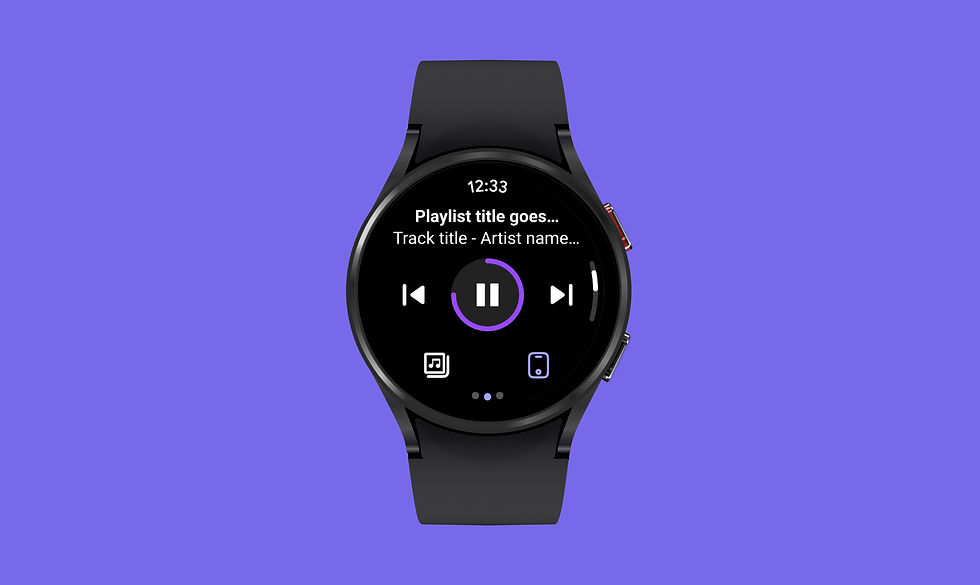
The WatchOS app was designed to provide a seamless and intuitive audio experience on Apple Watch and Wear OS devices. Given the limited screen size and interaction constraints, the focus was on quick accessibility, ease of navigation, and minimal distractions while maintaining a consistent brand identity across platforms.
.png)

Challenges:
Cross-Platform Design Consistency – The biggest challenge was ensuring the design aligned with both Apple’s Human Interface Guidelines (HIG) for WatchOS and Google’s Material Design for Wear OS while maintaining a consistent brand identity across both platforms.
Hands-Free Control – Integrating voice commands to improve usability while minimizing touch-based inputs.
Adapting to Different UI Frameworks – Apple WatchOS and Android Wear OS have distinct interaction patterns, typography, and component structures, requiring a flexible yet cohesive design approach.
Touch & Gesture Optimization – Ensuring quick and easy interactions without cluttering the screen.


To overcome the cross-platform challenges while ensuring a seamless user experience, the following design strategies were implemented:
Cross-Platform UI Consistency
Developed a unified design system that maintains brand consistency while adapting to Apple’s Human Interface Guidelines (HIG) and Google’s Material Design for Wear OS.
✦ Used platform-specific UI components (e.g., Apple’s rounded buttons vs. Wear OS’s card-based lists) while keeping colors, typography, and branding consistent.
✦ Created adaptive layouts that work for both square and circular watch faces.
Optimized Small-Screen Interactions
Designed an information hierarchy that prioritizes quick interactions while maintaining readability in small spaces.
✦ Created large, tap-friendly controls for effortless interaction.
✦ Used high-contrast text & scalable typography to ensure glanceability even in motion.
✦ Optimized the Now Playing screen with dynamic album artwork, DJ details, and real-time progress updates for an immersive audio experience.
Minimalistic & Glanceable UI
✦ Large, Tap-Friendly Controls – Buttons and interactive elements were designed with adequate spacing and size to ensure effortless navigation, even on smaller screens.
✦ Prioritized Essential Information – Displayed only the most relevant content (e.g., now playing, playback controls, and station details) to minimize clutter and enhance focus.


Car Infotainment UX/UI Design– (Android Auto & Carplay)
The car infotainment system was designed to deliver a seamless, distraction-free audio experience for drivers using Android Auto and Apple CarPlay. The challenge was to align the interface with both platforms’ design standards while ensuring safe, intuitive, and hands-free interaction.
Challenges & Design Solutions
Platform-Specific UI Adaptation –
Ensured the design met Apple CarPlay’s HIG and Android Auto’s Material Design, optimizing elements like button sizes, spacing, and layout for quick, glanceable interactions.
Seamless Cross-Device Playback – Designed real-time sync between mobile, smartwatch, and car infotainment, allowing users to switch devices without losing progress.
Quick Access to Live Radio & Podcasts – Created a streamlined layout for browsing stations, DJ details, and podcasts with one-tap play functionality.
Minimalist Interface for Safe Driving –
Used a dark mode-first design with large touch targets and high-contrast UI to reduce eye strain.
A user-friendly, visually optimised, car infotainment interface that enables safe, distraction-free access to live radio and podcasts, ensuring a smooth and immersive in-car listening experience.

Mobile App UX/UI Design -
Digital Audio Experience
Designing a feature-rich yet intuitive mobile experience that allows users to:
✦ Browse and listen to 12 radio stations seamlessly.
✦ Explore DJs & their podcasts with detailed content.
✦ Create a personalized listening experience while maintaining a lightweight UI.
.png)
.png)


Approach & Execution:
Followed Apple’s Human Interface Guidelines (HIG) & Material Design principles for a platform-native feel.
✦ Designed an intuitive, tab-based navigation for quick access to radio stations, DJs, and podcasts.
✦ Incorporated smart search & filters to help users discover content efficiently.
✦ Used dynamic typography & contrast ratios to enhance readability & accessibility.

A visually engaging, easy-to-navigate
app that enhances content discovery
& user engagement.
Optimized for both iOS & Android, maintaining a consistent brand identity while adhering to platform guidelines.

bottom of page